Orbit Downloader v2.3.1 Come Out!
Orbit Downloader v2.3.1 Come Out!
In this version, we fix some bugs which may cause Orbit Downloader crash.
Orbit Downloader is more stable now.

3
comments
 Labels:
new-release
Labels:
new-release
Orbit Downloader v2.3.1 Come Out!
In this version, we fix some bugs which may cause Orbit Downloader crash.
Orbit Downloader is more stable now.
3
comments
Labels:
new-release
How to Download IMEEM Music Free
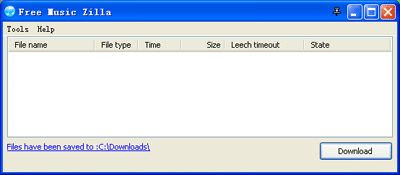
Our other product - Free Music Zilla is a free IMEEM music downloader which can help you to download IMEEM music free and easily .
Keywords: How to Download IMEEM Music Free
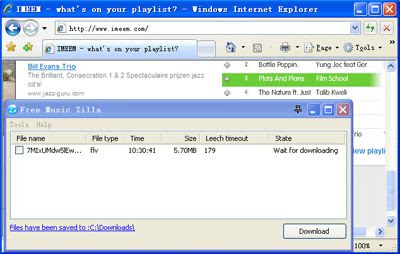
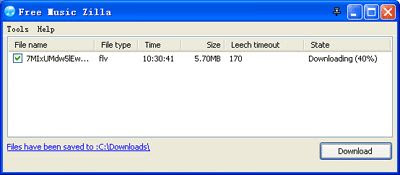
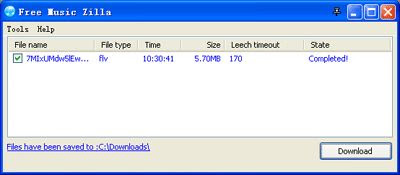
Please download it before 'Leech Timeout' count down to 0 and keep the music is playing when downloading.
Orbit Downloader can support 4GB+ file now!
In v 2.2.1, Orbit Downloader can download file more than 4GB.
Changelog:
14
comments
Labels:
new-release
Orbit Downloader v2.1.7 is released!
In this version, we improve download logic to promote download speed and fix a bug may cause Orbit Downloader crash.
0
comments
Labels:
new-release
0
comments
Labels:
tutorial
Orbit Downloader v2.1.6 is released!
1. Improve Grab++ to grab the *.rm file and *.swf file
2. Fix the encoding error in some Eastern Language OS
3. Improve the Opera addon -- Add ' Grab video by Orbit ' to Opera's context menu.
4. Fix the bug: DropZone may cause some games minimized
5. Fix some bugs
2
comments
Labels:
new-release
How to Download Youtube Video in Opera?
I have posted a tutorial about How to Download Youtube Video in IE and other tutorial about How to Download Youtube Video in Firefox. But if you like Opera, how can you use Orbit Downloader as Youtube Video Downloader in Opera? You can follow this way bellow:
1. Check whether the Orbit Downloader is monitoring the Opera at Preferences-->Monitoring:
( If it is unckeck, please exit Opera then check the Opera item)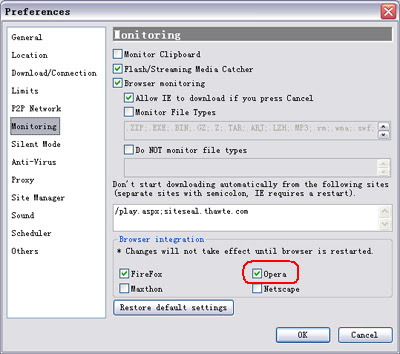
2. Check whether the Orbit Downloader Grab++ is monitoring the Opera at Grab++-->Actions-->Preferences-->Monitoring: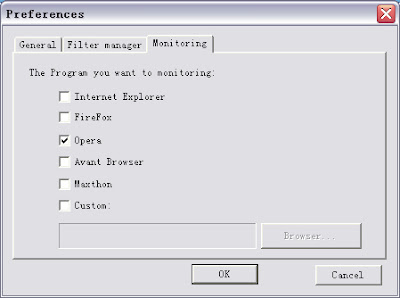
3. Run the Orbit Downloader Grab++ ( Tools-->Grab++) first, then visit a Youtube video. I also make ' Create a Lemon Battery' for example. When the video is playing, you can see that the video is grabbed by the Grab++: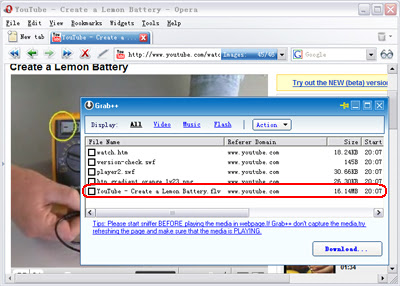
4. Check the grabbed Youtube video, then click 'Download' button, the 'Create New Download' dialog will pop up: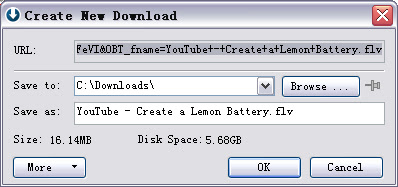
5. Click the OK button , you will download the Youtube video :)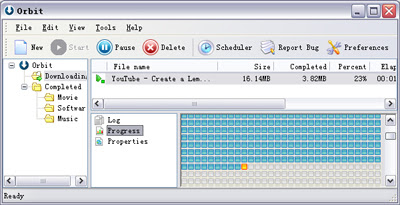
Tips:
1. In Opera, if you want to download Youtube video, you should run Grab++ manually ( Orbit Downloader Tools menu-->Grab++).
2. If you play the video first then run Grab++, you should reload the page to allow the Grab++ grab the video.
3. You can use this way to download any video and music in any web browser including IE and Firefox.
4. The YouTube videos are in FLV format. And lots of FLV players are in software download sites. Or you can download one of them at here.
5. Some of the YouTube videos can not be resumed because file-resume is forbidden in some YouTube servers. If the connection is break when downloading, you could redownload it by clicking the download item's context menu 'Restart download'.
Relate Link:
1. How to download Youtube video in IE?
2. How to download Youtube video in Firefox?
