Download YouTube Video-As Youtube Downloader

How to download Youtube Video?


How to use Orbit Downloader as a Youtube Downloader?


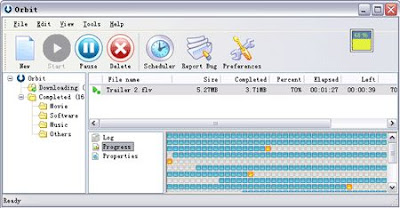
Orbit Downloader can be use as a free YouTube downloader which could help you to download videos from YouTube easily with great speed. Also it can download the embedded YouTube Video from any webpages. Also Orbit Donwloader can download and manage videos and clips from almost all of video sharing websites like Dailymotion, Metacafe, Google, Myspace, iFilm...

Here is a step by step tutorial for how to download Youtube Video from YouTube using Orbit Downloader:

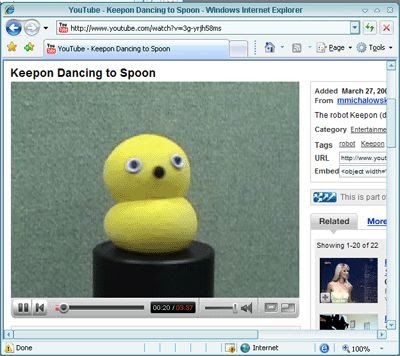
1. Browse a YouTube in IE, using http://www.youtube.com/watch?v=3g-yrjh58ms for example:
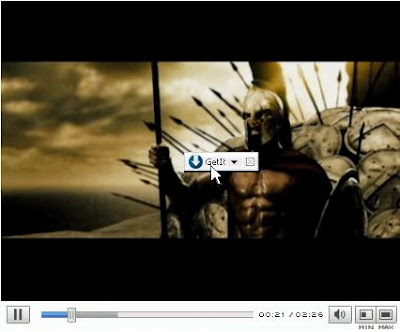
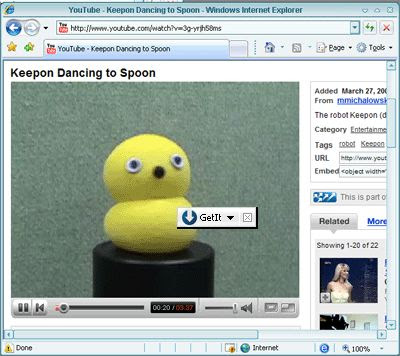
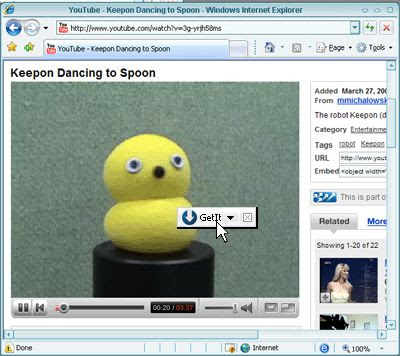
2. Hover your mouse on the YouTube Video, you will see a small button appeared near your mouse, like this:
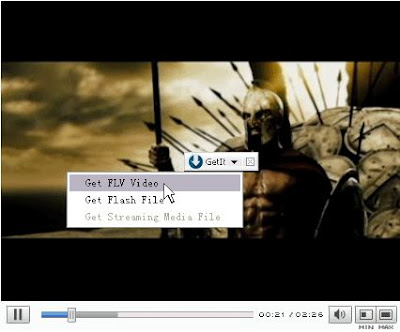
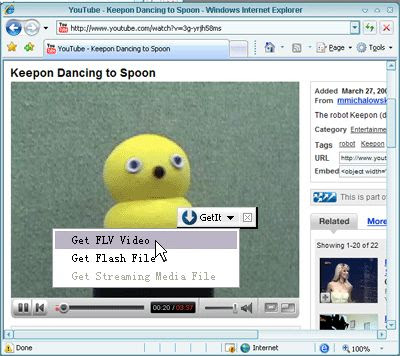
3.Click the button, then click the "Get FLV Video" item to download the YouTube Video:

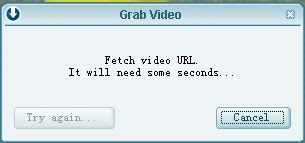
4.Then Orbit Downloader will pop up a dialog to fetch the YouTube Video URL. It will need about 2 seconds.
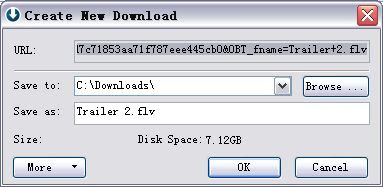
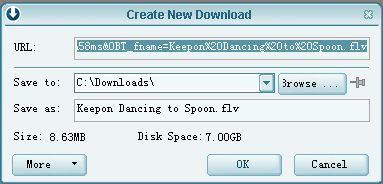
5.Soon, the "Create new download" dialog pop up. Click "OK",then the YouTube Video is being downloaded.
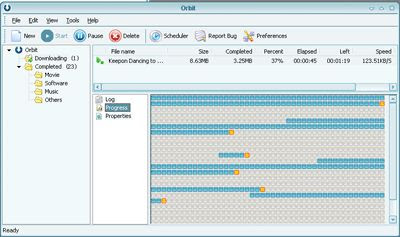
How to create batch download using Orbit Downloader v1.5.3

Web sites that have many files often use file-naming conventions whereby they name their files using a series of numbers or letters. For example a MP3 site may name the MP3 files as hot-track1.mp3, hot-track2.mp3 … hot-track12.mp3. From this you can see that they are just a series of MP3s numbered from 1 to 12. Or, a photo sharing site may name its photos as tree-a.gif, tree-b.gif … tree-z.gif. From this, you can see that they are just a series of photos numbered from a to z.

Using Orbit Downloader, you can create a batch download to download a series of downloads from website easily. And there is an example tutorial below:

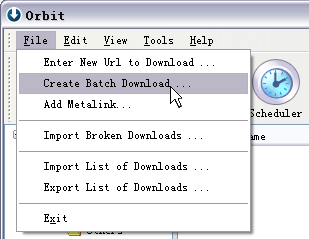
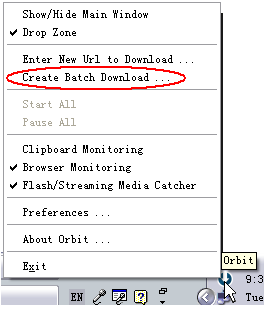
1. You can open the “Create batch download” dialog through arbitrary way below:
(1) From the main menu “File”-->”Create batch download…”:


(2) From the tray icon’s context menu:

(3) From the Drop Zone’s context menu:

2. Configure the “Create Batch Download” dialog to download series downloads.

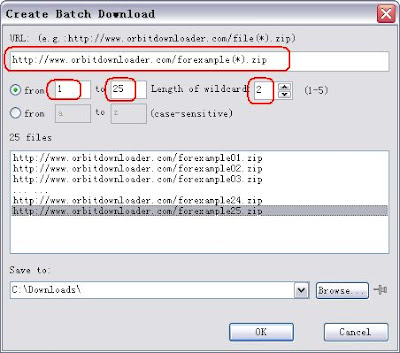
(1) If there is a series of download URLs like these:
http://www.orbitdownloader.com/forexample01.zip
http://www.orbitdownloader.com/forexample02.zip
…
http://www.orbitdownloader.com/forexample25.zip

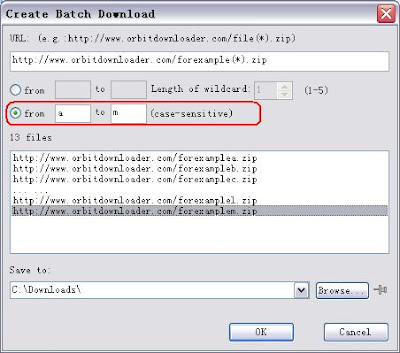
You can configure the “Create batch Download” dialog like this below to download the series of zip-files:


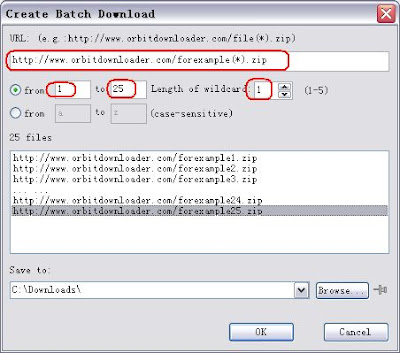
(2) If a series of download URLs like these:
http://www.orbitdownloader.com/forexample1.jpg
http://www.orbitdownloader.com/forexample2.jpg
…
http://www.orbitdownloader.com/forexample25.jpg

You can configure the “Create batch Download” dialog like this:


(3)The same way,If the series download URLs like these:
http://www.orbitdownloader/forexample-a.gif
http://www.orbitdownloader/forexample-b.gif
…
http://www.orbitdownloader/forexample-m.gif
You should configure it like this:

Orbit Downloader v1.5.3 is released

Orbit Donwloader v1.5.3 is released!
Change log:
* Add "IE Context" tab in the "Create New Download" dialog
* Add "Add to Site Manager" option in the "General" tab of the "Create New Download" dialog
* Improve the "Create batch download" feature
* Fix some bugs running in Windows Vista
* Fix some bugs

Orbit Downloader v1.5.2 Come Out!

We released Orbit Downloader v1.5.2 just now!

What makes Orbit Downloader so special is the ability to download Flash Video from almost all video sharing websites, include YouTube, Dailymotion, Metacafe, Google, Myspace, iFilm and etc.
As an added bonus, Orbit Downloader provides embedded Flash Video downloaded. It is in some ways more neat than useful. You can download embedded Flash Video from any webpages, such as your friend's blog, using Orbit Downloader.

And Orbit Downloader v1.5.2 improved the Flash Video downloaded feature and fix some bugs.

How to Download FLV (Flash Video) from Flash Video sites?

Use Orbit Downloader as FLV (Flash Video) Downloader

How to Download FLV (Flash Video) from Flash Video sites?

FLV (Flash Video) is a proprietary file format (*.flv) used to deliver video over the Internet using Adobe Flash Player.
Notable users of the FLV (Flash Video) include
YouTube,
Google Video,
Myspace,
Metacafe,
Dailymotion,
iFilm and etc.

Orbit Downloader improve "Grab Video" feature to support almost all of video sharing websites.
Our new resolution technique has the advantages over the old Web Service API Solution ,details as follow:

1.Enables the user to download video from almost all video sharing websites,including the existing and upcoming web sites. Needn't add development resource to each newly brought-out website.

2.Based on MHT(Multi-server Hyper-threading Transportation) technique and optimization arithmetic, orbit downloader can make you download files up to 500% faster than before.

3.Convenience for the user in operation of downloading and organizing.

Making iFilm.com for example below, you could see how to download FLV (*.flv) from flash video sites like iFilm.com .

(1) Hover your mouse on the playing video, you will see a small button appeared near your mouse,
like this:


(2) Click the button, then click the "Get FLV Video" item:


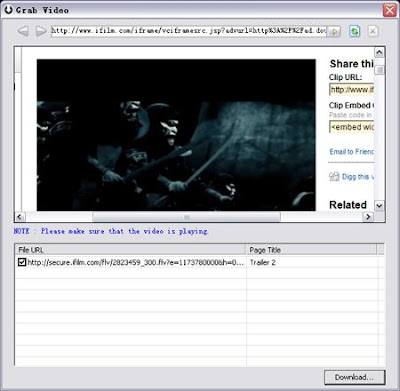
(3) Then Orbit Downloader will run Orbit Grab Video to grab the FLV (Flash Video)'s url. It will need about 2 seconds.
Then the Flash Video's URL will be listed in the list-box.
And the Flash Video file (*.flv) item will be checked by default.


(4) Click the "Download..." button, the checked FLV (Flash Video) will be downloaded by Orbit Downloader:

Orbit Downloader v1.5.1 come out

In the new version 1.5.1 we improve "Grab Video" feature to support almost all of video sharing websites. Our new resolution technique has the advantages over the old Web Service API Solution ,details as follow:
1.Enables the user to download video from almost all video sharing websites,including the existing and upcoming web sites. Needn't add development resource to each newly brought-out website.
2.Based on MHT(Multi-server Hyper-threading Transportation) technique and optimization arithmetic, orbit downloader can make you download files up to 500% faster than before.
3.Convenience for the user in operation of downloading and organizing.

Version 1.5.1 also add block list in browser monitoring feature, improve "Anti-Virus" feature, and fix some bugs.

Orbit Downloader v1.4.6 support FireFox 3 (Gran Paradiso)

Orbit Downloader v1.4.6 is released.
The improved FireFox add-on can integrate FireFox more smoothly and support FireFox3 (Gran Paradiso).

(1)Download files in FireFox 3 (Gran Paradiso):


(2)Download Youtube video in FireFox 3 (Gran Paradiso):


(3)Download flash game in FireFox 3 (Gran Paradiso):