Orbit Downloader v2.1.7 is released!
Orbit Downloader v2.1.7 is released!
In this version, we improve download logic to promote download speed and fix a bug may cause Orbit Downloader crash.

0
comments
 Labels:
new-release
Labels:
new-release
Orbit Downloader v2.1.7 is released!
In this version, we improve download logic to promote download speed and fix a bug may cause Orbit Downloader crash.
0
comments
Labels:
new-release
0
comments
Labels:
tutorial
Orbit Downloader v2.1.6 is released!
1. Improve Grab++ to grab the *.rm file and *.swf file
2. Fix the encoding error in some Eastern Language OS
3. Improve the Opera addon -- Add ' Grab video by Orbit ' to Opera's context menu.
4. Fix the bug: DropZone may cause some games minimized
5. Fix some bugs
2
comments
Labels:
new-release
How to Download Youtube Video in Opera?
I have posted a tutorial about How to Download Youtube Video in IE and other tutorial about How to Download Youtube Video in Firefox. But if you like Opera, how can you use Orbit Downloader as Youtube Video Downloader in Opera? You can follow this way bellow:
1. Check whether the Orbit Downloader is monitoring the Opera at Preferences-->Monitoring:
( If it is unckeck, please exit Opera then check the Opera item)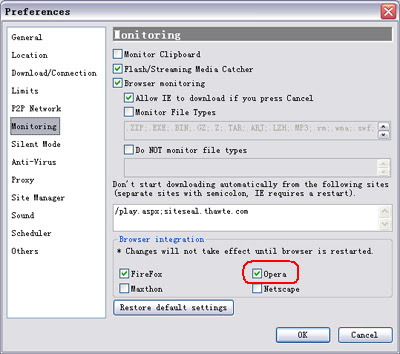
2. Check whether the Orbit Downloader Grab++ is monitoring the Opera at Grab++-->Actions-->Preferences-->Monitoring: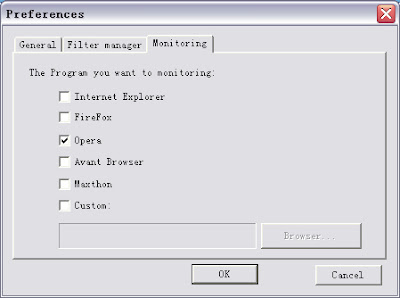
3. Run the Orbit Downloader Grab++ ( Tools-->Grab++) first, then visit a Youtube video. I also make ' Create a Lemon Battery' for example. When the video is playing, you can see that the video is grabbed by the Grab++: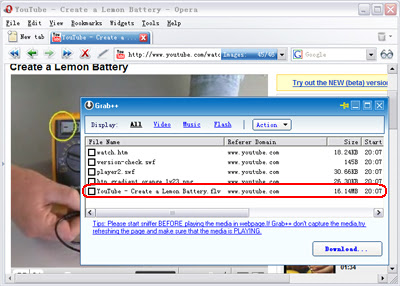
4. Check the grabbed Youtube video, then click 'Download' button, the 'Create New Download' dialog will pop up: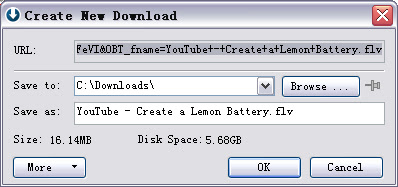
5. Click the OK button , you will download the Youtube video :)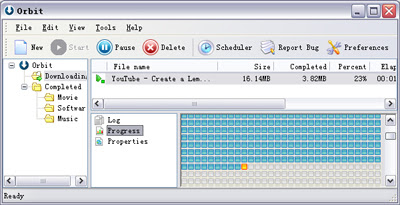
Tips:
1. In Opera, if you want to download Youtube video, you should run Grab++ manually ( Orbit Downloader Tools menu-->Grab++).
2. If you play the video first then run Grab++, you should reload the page to allow the Grab++ grab the video.
3. You can use this way to download any video and music in any web browser including IE and Firefox.
4. The YouTube videos are in FLV format. And lots of FLV players are in software download sites. Or you can download one of them at here.
5. Some of the YouTube videos can not be resumed because file-resume is forbidden in some YouTube servers. If the connection is break when downloading, you could redownload it by clicking the download item's context menu 'Restart download'.
Relate Link:
1. How to download Youtube video in IE?
2. How to download Youtube video in Firefox?
How to Download Youtube Video in Firefox?
There are lots of people ask me how to download Youtube video in Firefox ( Use Orbit Downloader as Youtube downloader in Firefox). Here is a step by step tutorial below:
1. Check whether your Firefox is monitoring at Preferences-->Monitoring:
( If it is uncheck, please exit Firefox then check the item. )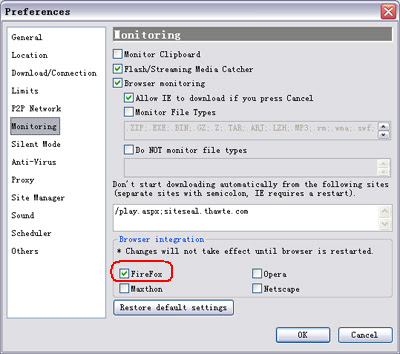
2. Open a Youtube video. I make ' Create a Lemon Battery' for example. You can see a small-gray Orbit Downloader icon on the top of the video:
3. Click the icon, Orbit Downloader will fetch the video for you:
4. After fetch the video URL - about 2 second or more quickly, the ' Create New Download' dialog will pop up: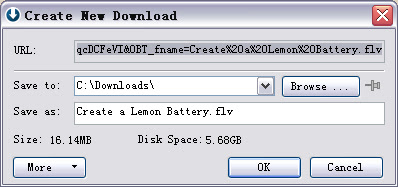
5. Click the OK button , you will download the Youtube video :)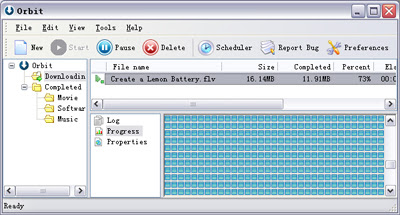
Using this way above, you can download flv video from Youtube, Google, Myspace, Metacafe and Dailymotion in Firefox.
Tips:
1. The 'GetIt' button is changed to a small-gray icon in Firefox. Just click it!
2. The YouTube videos are in FLV format. And lots of FLV players are in software download sites. Or you can download one of them at here.
3. Some of the YouTube videos can not be resumed because file-resume is forbidden in some YouTube servers. If the connection is break when downloading, you could redownload it by clicking the download item's context menu 'Restart download'.
Relate Link:
1. How to download Youtube video in IE?
2. How to download Youtube video in Opera?
Orbit Downloader v2.1.5 is released!
1. Improve Firefox addon ( Thanks Nelson)
2. Fix DropZone bug: DropZone may cause the full-screen mode exit
3. Improve Tray Icon feature: Show mail window by one click
4. Add 'Clean list of completed downloads' feature to 'Edit' menu
5. Add TrayIcon for Grab++
In the Grab++->Actions->Preferences dialog, if the 'Close to system tray' is checked, the Grab++ will minimize to system tray when click 'Close' button.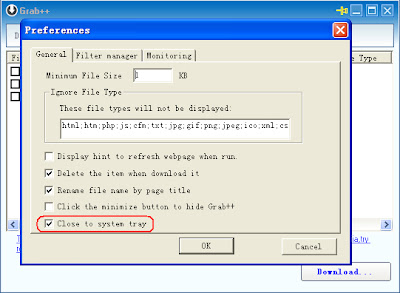
6. Fix some bugs
6
comments
Labels:
new-release
Orbit Downloader is a freeware. You can use it for free as long as you like.
However, if you think Orbit Downloader is valuable and you want to support us through monetary donations, you are encouraged to do so. Your donation will help the development going and help Orbit Downloader to be the best download manager.
Please select an amount that you think Orbit Downloader is worthy of and click the Donate button. All online transactions are safe and secured.
Thanks!

